

To log in to Amazon Slots, open the casino's own website, choose to log in and enter the email or username and password you registered with. The steps above set out the sequence. This page covers what to have ready and what to do when sign-in does not work. This site has no login form, so nothing you type here can reach your account.
Before you start, gather a few things:
- the email address or username you registered with
- the password you chose, or access to the email inbox you will need if you have to reset it
- a device with a current browser and a stable connection
- your verification documents, if you have not yet sent them
If you have not registered yet, sign up first and come back to this page afterwards. If you have registered but cannot remember which email address you used, work through the inboxes you normally use before contacting support. It saves time to know that detail when you do.
What happens behind the login screen
Where you sign in
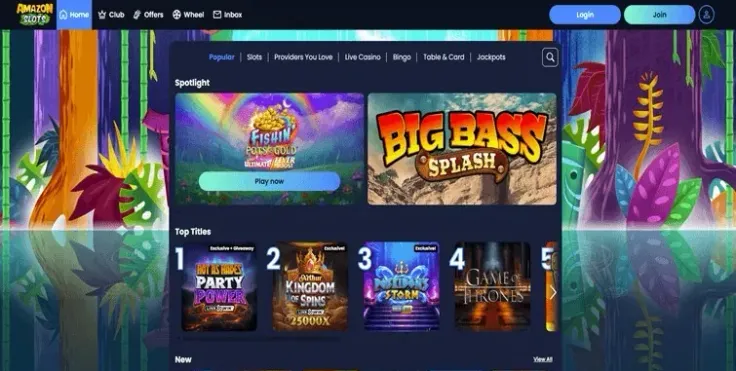
Amazon Slots runs on its website, which works on desktop and on mobile. The casino has no iPhone app and no Android app. On a phone or tablet you sign in through the mobile browser, and the mobile version page explains what that looks like. Because there are no apps, treat any download or store listing that claims to give you Amazon Slots login access with suspicion. The reliable route is to open the website yourself and sign in there.
Your sign-in details
The login screen asks for the email address or username and the password you registered with. Both must match exactly what you entered at registration. Small differences cause most failed attempts: a capital letter in the wrong place, an extra space copied in from another document, or a different email address from the one you actually used. If your browser or password manager has saved details, check that it is offering the right ones, as an old saved password will be rejected.
Why verification is part of the picture
UK-licensed operators must check the age and identity of a customer before that customer can deposit or play, and Amazon Slots requires verification. Logging in and verifying are separate things: your password gets you into the account, while verification confirms who you are. You will probably meet the verification stage soon after you register, so it helps to know what is asked for.
The documents are: Photo ID (passport or driving licence) + selfie, Proof of address (utility bill or government letter dated within last 3 months) and Proof of payment method (card photo with name and last 4 digits).
The verification guide goes through each one. Two practical points apply across the list. First, the name on every document should match the name on your account. Second, anything that has to be recent should meet the date requirement shown in the list above, so an older utility bill will not do.
What takes time
Some parts of this are in your hands and some are not. You control how quickly you gather clear photos, whether the details match and whether your password is correct. Reviewing documents and answering support emails is up to Amazon Slots. The email reply time is part of the support hours: Live chat 6am–9pm (BST), 7 days a week; email reply within 2 business days. Plan around that if you are sending documents or asking about a problem by email rather than live chat.
Support channels
Live chat and email are available. There is no phone support. Live chat suits quick questions about getting into your account, while email suits cases where you need to attach images or explain a longer history. Keep the same email address in your messages as the one on your account so support can find you.
18+ · T&Cs apply
Common login problems and what to do
You have forgotten your password
Use the password reset option on the login screen, as shown in the steps above. Make sure you enter the email address or username you registered with, not another address you use for other services. When you choose the new password, avoid reusing one from another website. If the reset does not work, contact support and describe exactly what happened.
The details are rejected although you think they are right
Go through the simple causes in order:
- Check whether caps lock is on.
- Type the password by hand instead of pasting, in case a hidden space came with it.
- Try the other identifier. If you entered an email address, think about whether you set up a username, and the reverse.
- Look at what your browser has autofilled, because it may have filled in details from an older account.
- Try a different browser or a private window.
If several attempts fail, stop and use the reset option rather than guessing repeatedly.
The page will not load or looks wrong
Check your connection first, then reload the page. If the problem continues, try another browser or update the one you use. Clearing the saved site data can help if the page loads but behaves oddly. This is general troubleshooting advice and applies to any website.
Look closely at the address bar before you type anything. Look-alike websites exist for most well-known brands. If you arrive through a search result, an email or a message and the page feels off, close it and open Amazon Slots from a bookmark you saved yourself or by visiting Amazon Slots from this page.
A document is rejected or you cannot upload it
Most rejections come from the image rather than the document. Photograph it in good light on a flat surface, keep all four corners and every line of text in the frame, and make sure nothing is cut off or covered. The selfie should show your face clearly next to the ID. For proof of payment, the card photo needs to show your name and the last digits of the card, and you should cover the rest of the number. Check that dates fall inside the period set out in the document list. If a document is still not accepted, ask support what exactly was wrong before you send it again.
You suspect someone else has used your account
Change your password straight away from the reset option, then contact support by live chat and tell them what you saw. Check your email for anything you did not do yourself. If you used the same password anywhere else, change it there too.
When to contact support
Contact support when the reset does not work, when you cannot work out which email address is on the account, when a verification document keeps being rejected or when you think your account has been used without your permission. Live chat and email are the two channels, and phone is not offered. Support hours are: Live chat 6am–9pm (BST), 7 days a week; email reply within 2 business days. When you write, give your registered email address or username, describe what you see on screen and say what you have already tried. Never include your password in a message. The contact page lists how to reach the team.
Keeping your account secure

Enter your password only on Amazon Slots's own website. Nobody from the casino or this site needs your password. A message or page asking you to confirm it is a warning sign.
Use a password you use nowhere else. A password manager can generate and store a long one so that you do not have to remember it. If one of your other accounts is ever exposed, your Amazon Slots account is not affected.
Keep the sign-in details private. Do not share the login with other people, and do not save them on a shared or public device. If you do sign in on a device that is not yours, log out before you leave it and do not tick any option to stay signed in.
Avoid public Wi-Fi for anything involving your account. If you have to use it, your own mobile connection is the safer choice.
Bookmark the site. Opening Amazon Slots from your own bookmark removes the risk of typing a slightly wrong address or following a fake link.
Keep your documents ready. Clear scans or photos of the items in the verification list, stored somewhere you control, make the process quicker when you need them. Check that the name on your account matches your documents and the names on the payment methods you use. You will meet this again on the deposits and withdrawals pages.
Set a deposit limit early. UK-licensed operators must offer deposit limits, and the safer gambling page explains what they are and how they work. Deciding on a limit before you play is easier than changing your habits once you are already in the middle of a session.
If you want to know more about how the casino is regulated, read whether Amazon Slots is safe.