
Making an amazon slots deposit means paying money into your Amazon Slots account through the cashier. You need to be logged in first. If you have not registered yet, start with how to sign up; if you already have an account, the login guide covers getting in.
Before you start, have three things ready:
- a payment method in your own name from the table above
- funds for at least the minimum of £10
- your verification documents, because identity checks are required at Amazon Slots
This site has no deposit form and never asks for card or account details. The sections below cover what sits behind the steps and what to do if a payment does not go through.
What happens behind the steps of a deposit

Every UK-licensed operator must verify a customer's age and identity before they can deposit or play, so expect Amazon Slots to ask for documents. The documents are: Photo ID (passport or driving licence) + selfie, Proof of address (utility bill or government letter dated within last 3 months) and Proof of payment method (card photo with name and last 4 digits). Have clear, full-page copies ready, because a cropped or blurred image is a common reason for a second request. The verification guide goes through them in more detail.
The proof of payment method ties your deposits to you. A card photo with your name and the last four digits is what is asked for, so deposit with a card or account registered in your own name. A payment from a method that belongs to someone else is likely to cause trouble at the verification stage.
Choosing between the methods
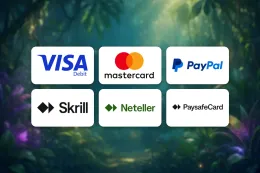
Amazon Slots accepts Debit Card (Visa/Mastercard), PayPal, Skrill, Neteller, Paysafecard and Pay by Mobile. They work differently, and the differences matter more than the logos:
- Debit card. Visa and Mastercard debit cards are accepted. Credit cards cannot be used for gambling in Great Britain, so do not try to pay with one.
- PayPal, Skrill and Neteller. These are separate accounts held with the provider. Their balance, fees and security checks are managed there, not at Amazon Slots.
- Paysafecard. This is a prepaid voucher. Check that its value covers the amount you enter in the cashier.
- Pay by Mobile. This is paid through your mobile account. Check the charges with your mobile provider before you use it.
Each provider applies its own limits and checks on top of the Amazon Slots minimum. If a payment is refused, the reason often sits with the provider rather than the casino.
Look at withdrawals before you pick a method
Not every deposit method is also a withdrawal method. The table above shows which options are available for each direction, so check it before you choose. The withdrawals guide explains how cashing out works and what to have ready for it.
18+ · T&Cs apply
If your deposit does not work
Most failed deposits come down to a small number of causes. Work through them in this order.
You cannot get into the cashier. You must be logged in. The login guide covers access problems.
The amount is rejected. Enter at least £10. An amount below the minimum will not go through, whichever method you use.
The payment is declined. Check the details you entered, the balance or voucher value, and the expiry date if you pay by card. Make sure the method is in your own name. If the details are right, the bank or provider may have blocked the payment, so contact them. You can also try another method from the table.
The money has left your account but your balance has not changed. Check your bank or wallet statement for a completed payment and note the date, amount and any reference. Do not repeat the payment straight away, because you could pay twice. Send the details to support and ask them to look into it.
A document is rejected. Read the reason given and send a better copy. A clear photo with all four corners visible, a name that matches your account and a proof of address within the time limit in the list above solve most cases. Take the selfie in good light, with the ID held as requested. Do not edit or alter any document; if you are unsure what is wanted, ask support.
Verification is holding things up. Make sure every document in the list above has been sent before you open a second request, and wait for the reply to the first one.
When to contact support
If none of this solves it, contact Amazon Slots support. Support is available by live chat and by email. Support hours: Live chat 6am–9pm (BST), 7 days a week; email reply within 2 business days. Live chat suits a payment problem that is happening now. Email suits a case that needs screenshots or a statement attached. Include your username, the method, the amount, the date and any error message, but never your full card number or password. More ways to get in touch are on the contact page.
Keeping your account and spending under control

Do not use a link in a message, an advert or another site to reach the cashier, and never give your password or a payment code to anyone who contacts you, including someone claiming to be from support. Use a password you do not use anywhere else.
Decide how much you are comfortable spending before you open the cashier, and set a deposit limit with the tools UK-licensed operators must offer. The safer gambling page explains how limits, time-outs and self-exclusion work. Treat the amount you deposit as the cost of entertainment, not as money you expect back.
A few habits make deposits easier:
- Keep your verification documents in a safe place, where you can reach them when asked.
- Deposit only with methods registered in your own name.
- Keep the confirmation of each payment until it shows in your balance.
- Check your balance and your bank or wallet statement after each deposit.
If you are depositing to take up an offer, read the terms on the welcome bonus page before you pay; T&Cs apply. If you are unsure about any other term or charge, read the terms and conditions or ask support before you pay, not after.